


Sabah & Sarawak to be relocated
Click above to read, and READ till the end.
It got me LMAO reading it especially the Two Guinness World Records and the Value for Money part.
Haha. What are they thinking...McDonald?
Sigh.. it was a very good laugh.
It got me and the girls laughing and imagining the impossible.
Even if there IS a Superman lifting both Sabah/Sarawak, I would rather move to other countries than joining with the peninsular side.
Don't get me wrong.
Why would you want to waste RM850 TRILLION and 10 years to do it?
Why dont feed the hunger and help those and everything else that need it most?
Why don't they improve what is there infront of our eyes?
Just look at the Sabah map in the article.
It's been rotated and facing down after SO many years facing side ways proudly.
Baik-baik labuan nearer to Peninsula, now it will become the furthest =_=
*shivers*
.
Bobidom
 bobidom@yahoo.com
View My Profile
Subscribe To Bobidom

 Posts
All Comments
Posts
All Comments
Why does it have to be car topic?
It happened to most Bruneian / Labuan friends I chat with.
Whyyyyyy? =___=
I looove sportish looking car, especially the Boxster, 911, Cayman, FairLady and Rx8 in White or Red.
I heart looking at them whenever I went to car show with my ex few years back.
I loooove to have them in my garage.
But I too know it'll take years of my pay check to even get one =_=
Izan gonna get the Cayene GTS soon AND modify it after that.
Ergh.
Doesn't he save his money??? Doesn't he has a future to think of??
"what do u mean my future?"
"modify makes ur car look more beautiful"
"just like u ladies..u put on make up, u look pretty rite, so same goes to cars"
"but making ourselves pretty doesn't cost millions like your car! =__="
"hahaahaha"
*sweat*
Note to self:
Must ignore car topic when I chat with these people.
Making me stress for owning piper, the kancil.
*I still love you Piper*
.
Whyyyyyy? =___=
I looove sportish looking car, especially the Boxster, 911, Cayman, FairLady and Rx8 in White or Red.
I heart looking at them whenever I went to car show with my ex few years back.
I loooove to have them in my garage.
But I too know it'll take years of my pay check to even get one =_=
Izan gonna get the Cayene GTS soon AND modify it after that.
Ergh.
Doesn't he save his money??? Doesn't he has a future to think of??
"what do u mean my future?"
"modify makes ur car look more beautiful"
"just like u ladies..u put on make up, u look pretty rite, so same goes to cars"
"but making ourselves pretty doesn't cost millions like your car! =__="
"hahaahaha"
*sweat*
Note to self:
Must ignore car topic when I chat with these people.
Making me stress for owning piper, the kancil.
*I still love you Piper*
.
The time has come...
After all the hardwork, effort and sacrifices, it's finally here..

Witness the 3rd Hobby Convention, 12th & 13th December, from 11am - 8pm at CityMall!
Enjoy the variety of hobby booths e.g. Game & Console, Toys & Figurines, Magic, Art, Free Tarot Reading and many more!!!
Meet and take picture with cosplayer from different anime series, participate in games, cosplay competition (Solo / Group), Street 2 - Gothic Lolita Punk (GLP) competition & also grab your hands on the Limited Edition HobbyCon 2009 merchandise too!
Bring your family, kids, friends.. and most importantly, BRING YOUR CAMERA!
See you at Hobbycon 2009 this weekend!
Please support Hobbycon by spreading this invitation to your friends & family :)
For more info, visit http://www.hobbycon.my
PS: My cosplay for this year will be.... *find out more at the event!*
.
It's the
HOBBYCON 2009!!!!
HOBBYCON 2009!!!!

Witness the 3rd Hobby Convention, 12th & 13th December, from 11am - 8pm at CityMall!
Enjoy the variety of hobby booths e.g. Game & Console, Toys & Figurines, Magic, Art, Free Tarot Reading and many more!!!
Meet and take picture with cosplayer from different anime series, participate in games, cosplay competition (Solo / Group), Street 2 - Gothic Lolita Punk (GLP) competition & also grab your hands on the Limited Edition HobbyCon 2009 merchandise too!
Bring your family, kids, friends.. and most importantly, BRING YOUR CAMERA!
See you at Hobbycon 2009 this weekend!
Please support Hobbycon by spreading this invitation to your friends & family :)
For more info, visit http://www.hobbycon.my
+++++
PS: My cosplay for this year will be.... *find out more at the event!*
.
Santa Hat Flash Mob tutorial
Few people had expressed their interest to join Jasmine's Santa Hat Flash Mob but not quiet sure on how to edit their picture nicely.
I had helped a few, and kinda figured out, why not I just post the tutorial I made for them for the rest to try as well :)
So here goes...
PS: This is just basic tutorial. You can do SO MUCH MORE with Photoshop ^__^
No. 1
No. 2
No. 3

No.4
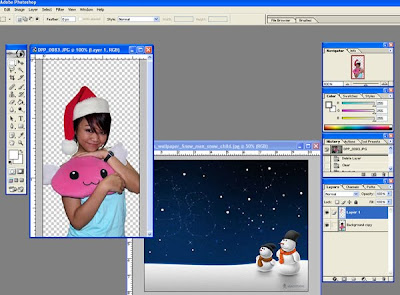
BONUS STAGE!
If you are feeling more creative, you can also key out your image background and replace it with a nice background.
and you're done!
Good luck!!! ^___^
.
I had helped a few, and kinda figured out, why not I just post the tutorial I made for them for the rest to try as well :)
So here goes...
PS: This is just basic tutorial. You can do SO MUCH MORE with Photoshop ^__^
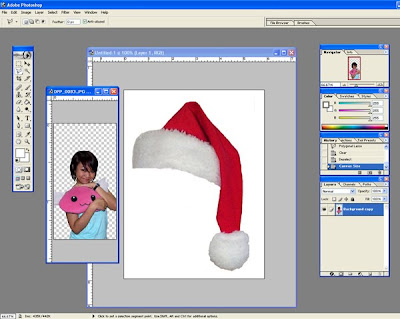
No. 1
Firstly, open your preferred photo and the santa hat

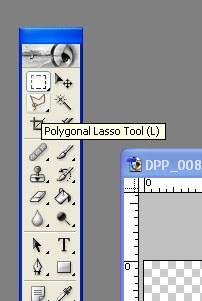
No. 2
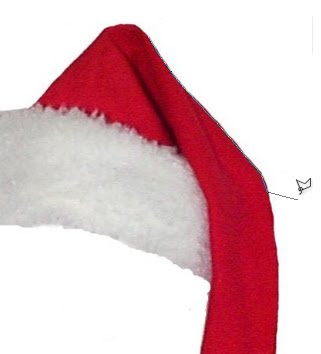
Select the Polygonal Lasso Tool to key out the white background behind the santa hat or, in the future, any other pictures you want.

- Using the tool, trace the santa hat :)

No. 3
After the first and the last end of the points connected, select CTRL+I (invert selection) to select the area OUTSIDE the selection, and press DELETE. If you don't do this, you'll delete the santa hat instead XD

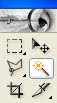
Another way of selecting the area you want to delete + FASTER, you can use the Magic Wand tool. Just click on the area that you want (try clicking it on the white bground behind the santa hat), it will auto select the areas with similar colours to the area you selected. Then, press delete.

No.4
- OK.. now that we have key out the background, it's time to put the hat on your selected picture :)
Using the Move Tool (the arrow), drag the santa hat file to your picture.
Put the hat layer on top of your 'ori picture' and name it "santa hat".

Resize the Santa Hat and adjust it (shortcut key: CTRL+T) to fit the size of the area in your picture (e.g. on the head).
You can minimize/close the santa hat working file now because we're now concentrating on the final file.

If you notice, i don't like the position of the hat. It covers my round face XD hehehe... so, click CTRL + T again, once it shows the bounding box, RIGHT CLICK on it and few options will come out. Select, FLIP HORIZONTAL and tada~ nicely positioned. You can also rotate it to adjust (as usual, select CTRL+T coz this option enable you to rotate, resize and so much more)


BONUS STAGE!
If you are feeling more creative, you can also key out your image background and replace it with a nice background.
For mine, i've keyed out my image background and choose a christmas'y' mood bground i got from the internet.
As what been done above, drag the new background to your current working file and place it under your 'Ori picture' layer. Let us name your background as 'New Background'
Then use CTRL+T again to resize the background and adjust it to anywhere and anyhow you like.

and you're done!
Tips:
Dont forget to adjust the brightness and contrast of your picture by selecting IMAGE -> Adjustment - > Brightness and Contrast.
You can also add basic glowy effect by selecting on your preferred layer e.g. Select the 'Ori picture' layer, right click on it and select BLENDING OPTIONS and then select GLOW.
Good luck!!! ^___^
.
Santa Hat Flash Mob
Jazzy Jasmine got a creative inspiration to put LOTS & LOTS of pictures
of people with Santa Hats on her tumblr.
Since Christmas is just 25 days ahead, why not support her Santa Hat Flash Mob
and let us all see the many creative photos sent to her, yes?
Now this is what I submitted:

I juuuust added the mistletoe *coz it's one of my wish list* Heh...


Nice or not??? XD
Not only am I loving the Christmas mood, Christmas trees, Christmas songs, mistletoe.. my bday is also next to it. Muehehehehehe XD
Anyways, just go to http://santahatflashmob.tumblr.com/ to get the simple instruction as well as the santa hat image and you're good to go to explore your photo collections and ready to edit them with whatever photo editing tools you're familiar with ;)
So how's YOURS gonna look like?
.
of people with Santa Hats on her tumblr.
Since Christmas is just 25 days ahead, why not support her Santa Hat Flash Mob
and let us all see the many creative photos sent to her, yes?
Now this is what I submitted:

I juuuust added the mistletoe *coz it's one of my wish list* Heh...


Nice or not??? XD
Not only am I loving the Christmas mood, Christmas trees, Christmas songs, mistletoe.. my bday is also next to it. Muehehehehehe XD
Anyways, just go to http://santahatflashmob.tumblr.com/ to get the simple instruction as well as the santa hat image and you're good to go to explore your photo collections and ready to edit them with whatever photo editing tools you're familiar with ;)
So how's YOURS gonna look like?
+++++
Popular bookstore is having a sale / book exhibition in center court, Lower Ground floor until the 6th Dec.
I NEED to somehow settle my tailor's payment before i buy all the collections of Sophie Kinsella's series!
Though I have all the series in e-book, still, nothing beats having an actual book in your hand XD
I NEED to somehow settle my tailor's payment before i buy all the collections of Sophie Kinsella's series!
Though I have all the series in e-book, still, nothing beats having an actual book in your hand XD
.
Site you should check out


In Loving Memory of Trisha


Site Meter
